
Independent browser-game field notes
Single Line Drawing Puzzle: Solving Shapes Without Retracing
Single Line Drawing Puzzle is a one-stroke logic game where every shape must be completed with a continuous path and no repeated edges.
View provider sourceOpens the attributed provider page. NovarGame does not embed this third-party runtime or claim to operate the game.
What the puzzle asks
Single Line Drawing Puzzle gives the player a clean brain-teaser rule: complete the given shape in one continuous line without retracing steps. The control is easy, but the planning can become tricky because the route must account for every segment.
The game is satisfying because the solution often appears once you find the right starting point. A shape that looks impossible from one corner may become simple from another. The challenge is not drawing quickly; it is understanding the path.
That makes it a good browser puzzle for players who like quiet logic and precise completion.
How to find a route
Before drawing, inspect the shape. Look for endpoints, corners with many connections, and narrow sections that could trap the path. In one-line puzzles, the start and finish positions matter. If the shape has obvious dead ends, one of them may need to be the start or the end.
Do not choose a start by whether it looks central or peripheral. The successful sailboat route began at the sail-and-mast junction. For a graph whose edges must each be used once, count how many edges meet at each junction: an Euler trail has two odd-degree endpoints, or every vertex has even degree for a closed route. This mathematical reasoning helps select a start; it does not prove every later game board uses the same rules.
Draw slowly enough to follow your plan. A mistaken overlap can ruin a good route even if the idea was correct.
Practical solving habits
Think of the drawing as a route through a small map. Each segment should be used once. If you enter a branch, ask how you will leave it. If a corner has several paths, save it until you know which direction connects the remaining shape.
When stuck, try reversing the route. Imagine where the final stroke should end, then work backward. This often reveals a better starting point.
The provider lists mobile touch and desktop mouse controls. NovarGame verified only the desktop runtime. Tight corners and small shapes are the places where input accuracy should be checked on any device.
Sharper decisions
A late-stage mistake is starting to draw before planning. Another is retracing a segment because the route entered a dead end too early. Players also sometimes focus on the outline and forget internal lines, which can leave an impossible leftover segment.
If a level fails repeatedly, change the start point first. Many one-line puzzles are solved by that single decision.
Where it fits
Single Line Drawing Puzzle suits players who enjoy logic paths, drawing games, brain teasers, and no-pressure problem solving. It is easy to start and rewarding to master because every solved shape feels clean.
Players looking for action or fast reflex challenges may be happier elsewhere; the appeal here is planning a perfect continuous path.
Compare drawing a route with drawing a bridge
Single Line Drawing Puzzle asks you to trace existing edges. Draw Bridge asks you to create a new supporting line and watch a car cross it. If you want a defined coverage problem, choose the sailboat guide; if you prefer testing the shape of a surface, choose the bridge guide. Both retained sessions reached an opening-level completion screen.
The best solves feel almost elegant. Once the correct starting point is found, the whole shape can unfold without backtracking, and the final line makes the earlier confusion look simple.
What happened in the recorded session
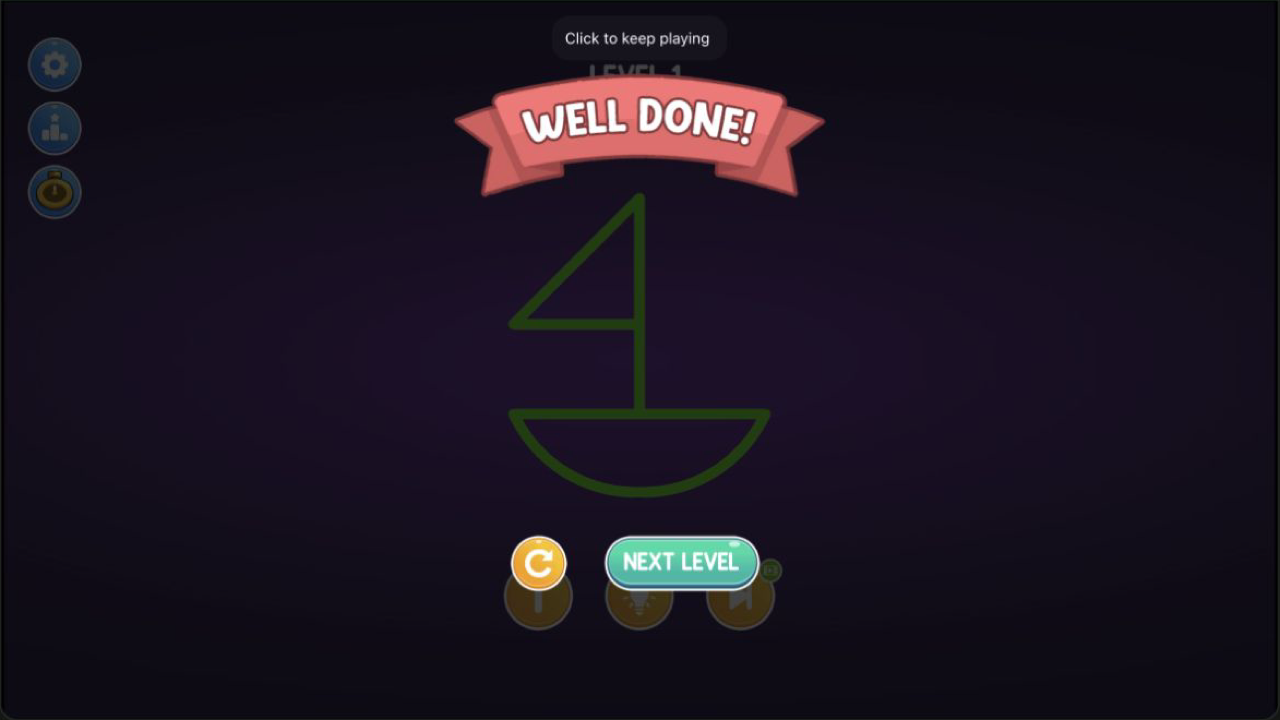
The desktop check solved the Level 1 sailboat rather than stopping at the menu. The first short drag did not cover the entire route. On the second attempt, the path began at the sail-and-mast junction, traced the sail triangle, continued through the mast and deck, and finished around the curved hull without lifting the mouse. The completed outline turned green and the game displayed “Well Done” with a Next Level button.
That result confirms three parts of the central loop: the game accepts a continuous pointer path, it evaluates whether the full graph has been covered, and it gives an unambiguous completion state. It also supports the practical advice to inspect junctions before drawing. The successful start point was not chosen for visual convenience; it allowed the branches of the sailboat to be visited without stranding an unused edge.
Limits and reader decision
The session covered only the first sailboat graph on desktop Chromium with a mouse. It did not test hints, timers, alternative valid routes, later shapes, difficulty progression, or touch accuracy. The green completion state proves one accepted solution, not that every strategy paragraph applies unchanged to later levels. This is a good fit for readers who enjoy quiet route planning and the satisfaction of a single exact solution. It is a poor fit for anyone looking for fast action, a story, or evidence about a long campaign.